



Here is my speed typing from school's computer and keyboard

This is just so freaking awesome especially for me, well guess what this only happened once
zzzz.... gotta train more
Until Den
~~

 Nokia Stereo Headset WH-205 Problem
Here is my speed typing from school's computer and keyboard
This is the 1st time I'm writting a photoshop tutorial
Version : Photoshop CS 3
Image Source : http://fav.me/d49e6lz
Vignette effect can be achieved easily if you have a lomography camera, but what if you don't have one?
Well the answer to your problem is Photoshop
So, here are the steps:
1. Open up the image in photoshop


Here is one cool website you should probably pay a visit to

Yup, just recently I have bought a webcam just because I don't have one since I got quite a number of computer device already not to mention scanner, speaker, touch pad, errr.... printer later.
So the webcam I'm talking about it of course

Yes, the long awaited Firefox 4 is now released and you can start downloading it now!
As of now, Mozilla Fireofox 4 has been downloaded 5.5million times. That is like much higher than Internet Explorer 9 for the calculation of per day.
 You saw that right hand side, impressive number
 New menu bar. Looks okay
 Some extensions not working, quite normal since it is a new version of browser for now
Well, recently I have operated this old pc which my dad wanted to throw away. OPERATE???
Not exactly. Lets just say removing those hardwares from the casing for fun
That is quiet an old PC. So here's the thing
http://www.facebook.com/album.php?aid=34757&id=1773571643&l=ae463cf398
Check it out dudes
Pls don't send me a friend request as I don't accept friend request from strangers despite how beautiful you maybe.
hahaha
Until Den
~~
 3:02 PM
 Dragexius ☺
, Posted in
boredom
,
Computer
,
Games
,
holiday
,
NS
,
rubic cube
,
SPM 2010
,
0 Comments
Dragexius ☺
, Posted in
boredom
,
Computer
,
Games
,
holiday
,
NS
,
rubic cube
,
SPM 2010
,
0 Comments
Yes, I wonder for how long would I be struggling in this midst of boredom. SPM is over for me and now I'm waiting for my result.
Currently I am not joining any colleges or so on as I would prefer to wait for my result and then well decide.
I didn't even get National Service 1st batch. So that makes me maybe 2nd batch. Well maybe 2nd. Till then, I am rotting in this seat of mine and typing out this post.
So I thought of finding someway to spend my time.
Hmm, why not Rubic Cube, I thought.
Yes solving the rubic cube was never like how I used to play it. I could still remember those days when I was still small and I would spend hours on that cube thinking of a way to solve 2 colours.|
Then whenever I see anyone completing it, I thought they were absolutely smart as in freaking smart.
Now that I know there is actually a formula for all this, I feel that anyone who completes it, doesn't mean they are genius or something. I could complete it in less than a minute I guess without the urge to think too much.
Well see, it is just that simple. As simple as ABC :D
And here's a picture of the condition of my rubic cube
See those colour that are scrape off. Well that is just how much I played rubic cube everyday in that fast mode of mine.
That's not all, I am on the pc for like almost the whole day. That is why I decided to pay a visit to my blog and update it. Yup, up-da-te it
Imagine playing the same old game everyday. Boring huh?
I guess I gotta get myself a cadbury-chocolate bar and let it melt in my mouth. That might just work. Hmmm, might.
Until Den
~~
Ok in this section I would basically tell you what are the list of Operating System you might want to install on your virtual machine and the reason behind it.
Here is the thing
I am currently still using Windows XP but for my virtual machine I am currently using Windows 7
Reason
-I love high performance for gaming. When you install new operating system, the minimum requirment for your graphic processing unit and your memory would be higher in the latest OS compared to XP. So I prefer XP
Problems Occuring
- Yup, sure got
- I can't install any sound device on it. Having problem with that
- You are not able to transfer files easily from your OS to your virtual machine
- You are totally not able to transfer files from your virtual machine to your OS
Why this problem occured?
- Simple, because Microsoft Virtual PC 2007 doesn't really support Windows 7. You may install it but you can't have Virtual Machine Additions
- This means that certain support is not available
Virtual Machine Additions supports
Virtual PC virtualizes a standard PC and its associated hardware. Supported Windows operating systems can run inside Virtual PC. Other operating systems like Linux may run, but are not officially supported.
This is what that is stated in the Wikipedia sites. You may refer to Wikipedia for more info on Windows Virtual PC.
So, here's the thing. What can you do with Virtual PC?

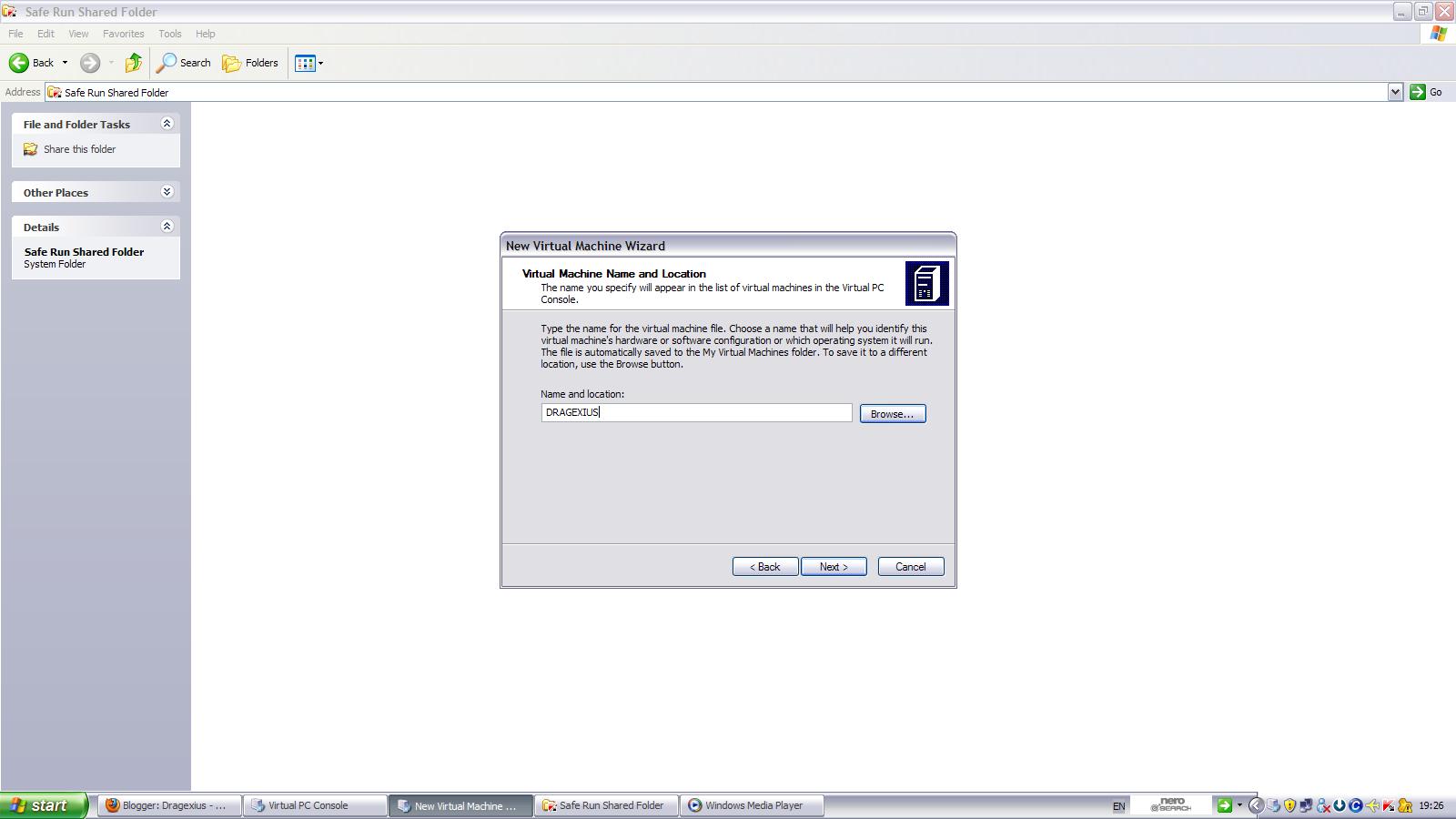 8) Click Next
 11) Select Hard Disk 1, then select Virtual Disk Wizard
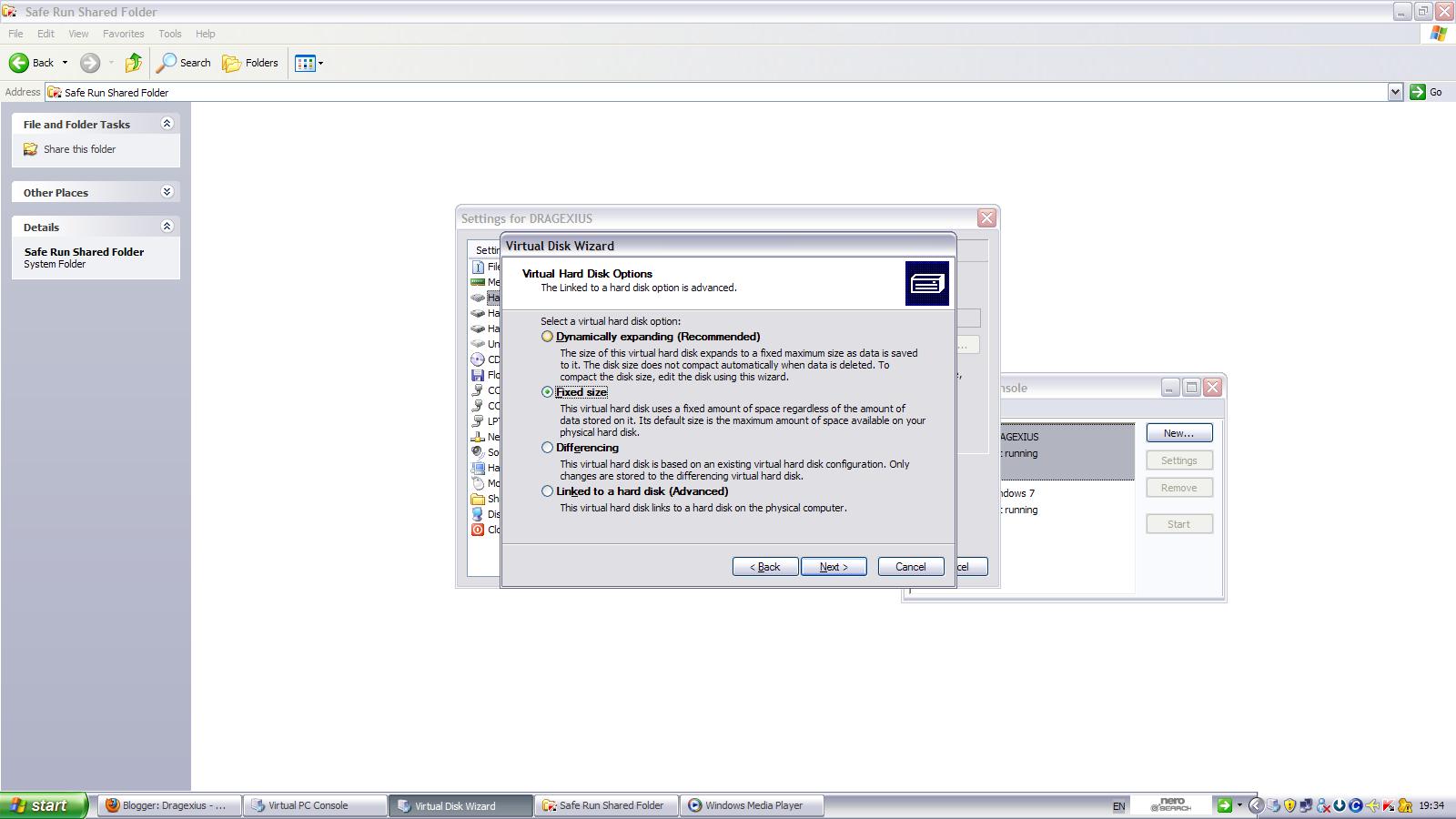 19) Enter the size you want. Take note that there is a limit
1:34 PM
Dragexius ☺
, Posted in
Computer
,
Facebook
,
Friends For Sale
,
Mafia Wars
,
Mousehunt
,
Mythmonger
,
0 Comments
19) Enter the size you want. Take note that there is a limit
1:34 PM
Dragexius ☺
, Posted in
Computer
,
Facebook
,
Friends For Sale
,
Mafia Wars
,
Mousehunt
,
Mythmonger
,
0 Comments
Ok, the blog was almost dead or in another word, almost extinct.
comes to think of it, the current layout for my blog
Lolx, I spent about 8hrs in a day just to get it done
Wait, not everything. Most of it to be a bit more precise
Yes... Blogging means type a lot n it makes my hand sought of pain when i type a lot
blek,
So, I spent almost my whole holiday on FACEBOOk
Yes, de most addicting for me
why not, it is coupled with lots of applications
Yes, Friends for Sale,
Juz achieve Hottest Pet & Pet Tycoon Achievement
Now, no cash oredi. hav to work all the way up again
Wat else, MOUSEHUNT
Yes, juz bought a new trap. Quite slow my progress
Now oni gt a DIGBY DRILL Bot equipped with an EXPLOSIVE BASE
Den, now gt rare mouse a lot coz it's christmast season
Den, MYTHMONGER
Brand new game from HITGRABS de same company as MOUSEHUNT
Oso slow, lvl14
Yes one more lvl & i I will get a new mentor slot
haizz, dunno wat to say
Den, MAFIA WARS
Everyday play den can lvl up to 2
Currently lvl 237
Woops, it is oso slow
Wat else
Still gt a lot
Haizz. next year SPM
Scary
Until Den
~~
 Deeper detail about the specs using CPU-z, GPU-z and PsInfo
Great
Blogging but yet nothing to say
How's that...
So, let's start with SCHOOLING
Went to school as usual and guess what... Realise that there is still LITERATURE COMPONENT homework which is not completed
OMG!!!
Since when????
Then I realise the homework was given on saturday and on that day I went for graphic design
Why no one mention about it!!!
Then , comes computer literacy
Guess what, Mr. Wong was teaching literature component
How's that... Then when he ask who knows how to use photoshop then you know what happens...
My name cames floating about in the air
Damn
Ask me question
wheww, lucky I can still answer otherwise dunno what to say
Then comes mr.SAM who tells me he wants meeting today
What in the world is that.. I thought I told them WEDNESDAY
So, first I say might not be able to attend then he replied nevermine he still continue the meeting
So, at last when I stayed back, it turned out that he went back early
DARN...
I hate it
WHY
WHY
WHY
Until Den
~~
5:45 PM
Dragexius ☺
, Posted in
Competition
,
Computer
,
Graphic Design
,
Green Awareness Technology
,
ITB
,
School
,
3 Comments
Yet another day...
Well, today was a schooling for my school and also there was this "GRAPHIC DESIGN COMPETITION" organized by my school's IT Brigade...
The main topic of this competition is all about

Recently I've visited Intel's Site.
I've came across one interesting subject
 Gordon Moore's Original Graph From 1965
Alrite, after a tiring day full of Photo-taking session, I made myself more tired.
Go to IT Lab after BM class. Guess wat?
The IT LAB was full of students. They were waiting for the speedtyping competition.
OMG. I hav to handle all of dat.
Go to c Pn.Murni to get some stuff den return back to handle the entrance fee for speed typing.
Dunno wat to say oredi.
How to hande so many people? However, proud to say 1 thing. This years speedtyping was the best since it has the most participant. Hooray!!!
After they left, few IT Brigadians and I started to test the speedtyping software. One of us, plucked 3 keyboard into one CPU and managed to broke a record of 467wpm(words per minute) with 0% accuracy.
Howver not as gud as the one with 2 keyboard but 500wpm with 0%accuracy. Haiizz, 2 keyboard win 3 keyboard.
Absolutely tiring.
I wan a rest.
Until Den
~~
Recently, I hav put a few blink effects on my text...
So let me explain bout this effect...
This effect is actually a HTML script n not a JAVA Script effect... GREAT right...
All content of the element of flashes on and off uncontrollably in a distracting manner.
The more content u place inside dis element, the more difficult is it to read between the flashes.
So try not to use this effect in all ur text as ppl will get ANGRY and Piss Offffffff...
Here's an EXAMPLE
Here's the code.. Replace the text "DRAGEXIUS" with ur desired text...
Simple Right....
Until Den
Overclocking is the process of forcing a computer component to run at a higher clock rate than it was designed for or was designated by the manufacturer.
Overclocking is usually practiced by PC enthusiasts in order to increase the performance of their computers. Some hardware enthusiasts purchase low-end computer
components which they then overclock to higher speeds, while others overclock
high-end components to attain levels of performance beyond what they were designed for.
Users who choose to overclock their components usually focus their efforts on
processors, video cards, motherboard chipsets, and Random Access Memory (RAM).
------------------------------------------------------------------------------------------------
Advantages
-The user can, in many cases, purchase a slower, cheaper component and overclock
it to the speed of a more expensive component.
-Faster performance in games, applications, and system tasks at no additional expense
-Some systems have "bottlenecks", where small overclocking of a component can help
realize the full potential of another component to a greater percentage than the
limiting hardware is overclocked. For instance, many motherboards with AMD Athlon
64 processors limit the speed of four units of RAM to 333 MHz. However, the memory
speed is computed by dividing the processor speed (which is a base number times a
CPU multiplier, for instance 1.8 GHz is most likely 9x200 MHz) by a fixed integer
such that, at stock speeds, the RAM would run at a clock rate near 333 MHz. Manipulating
elements of how the processor speed is set (usually lowering the multiplier),
one can often overclock the processor a small amount, around 100-200 MHz (less than 10%),
and gain a RAM clock rate of 400 MHz (20% increase), realizing the full potential of the
RAM
Disadvantages
-------------------------------------------------------------------------------------------------
The lifespan of a processor is negatively affected by higher operation frequencies,
increased voltages and heat. However, overclockers argue that with the rapid obsolescence
of processors coupled with the long life of solid state microprocessors (10 years or more),
the overclocked component will likely be replaced before its eventual failure. Also,
since many overclockers are enthusiasts, they often upgrade components more often than
the general population, offering further mitigation of this disadvantage.
Overclocking has a risky potential to end in component failure ("heat death").
Most warranties do not cover defunct units that result from overclocking activities
---------------------------------------------------------------------------------------------
Nowadays overclocking is made easier for pc users...
For instance the ASUS ROG RAMPAGE EXTREME which has Tweakit "joystick" whereby users get to use it to to optimize the performance outside of BIOS or OS.
 ASUS ROG RAMPAGE EXTREME
Text area are usually place in a blog for purposes like adding certain embeded code or any other codes for the purpose of sharing it. Here's the code for a "TEXT FIELD"
Here's an example of a text area code...
Here's the code for the text area
So what you need to do is just replace the text "DRAGEXIUS" with your desired code.
It is just that simple...
Until then.!.!.!
~dRaGeXiUs~
The main difference between http:// and https:// is -
It's all about keeping you secure, HTTP stands for HyperText Transport Protocol, which is just a fancy way of saying it's a protocol (a language, in a manner of speaking) for information to be passed back and forth between web servers and clients.
The important thing is the letter S which makes the difference between HTTP and HTTPS. The S (big surprise) stands for 'Secure'.
If you visit a website or webpage, and look at the address in the web browser, it will likely begin with the following:
http://. This means that the website is talking to your browser using the regular 'unsecure' language.
In other words, it is possible for someone to 'eavesdrop' on your computer's conversation with the website. If you fill out a form on the website, someone might see the information you send to that site.
This is why you never ever ever enter your credit card number in an http website!
But if the web address beg ins with https://, that basically means your computer is talking to the website in a secure code that no one can eavesdrop on.
You understand why this is so important, right?
If a website ever asks you to enter your credit card information, you should automatically look to see if the web address begins with https://. If it doesn't, there's no way you're going to enter sensitive information like a credit card number!
http VS https
pls remember when you buy any thing online make sure passing your information on the website showing https REPEAT https........ don't do anything that is without the 's'


